OVERVIEW
A tool to jumpstart the creative process
when choosing color schemes.
Color Block is a dynamic web app that generates cohesive, random color palettes on demand — built for designers, artists, and content creators who need a fast starting point instead of staring at a blank canvas.
Each click of "Generate Color Palette" produces six new colors, complete with hex codes, and applies them live to the page's own CSS — so the palette isn't just a static preview, it's demonstrated in context.
THE PROBLEM
Creative block is real,
and color can often be where it starts.
UI/UX designers, web designers, and content creators all hit the same wall: picking a color scheme from scratch.
Color Block was built to solve that specific friction point — giving people a fast, visual jumping-off point they could react to and refine, rather than starting cold.
so many colors… can't choose… ahhh

THE PROCESS
Bringing my idea to life,
sketching, coding, prompting.
Vizualizing the tool
Once I found an API that could support the implementation of my idea, I quickly sketched the three necessary screens (for the assignment) in order to visualize the layout and elements before building.
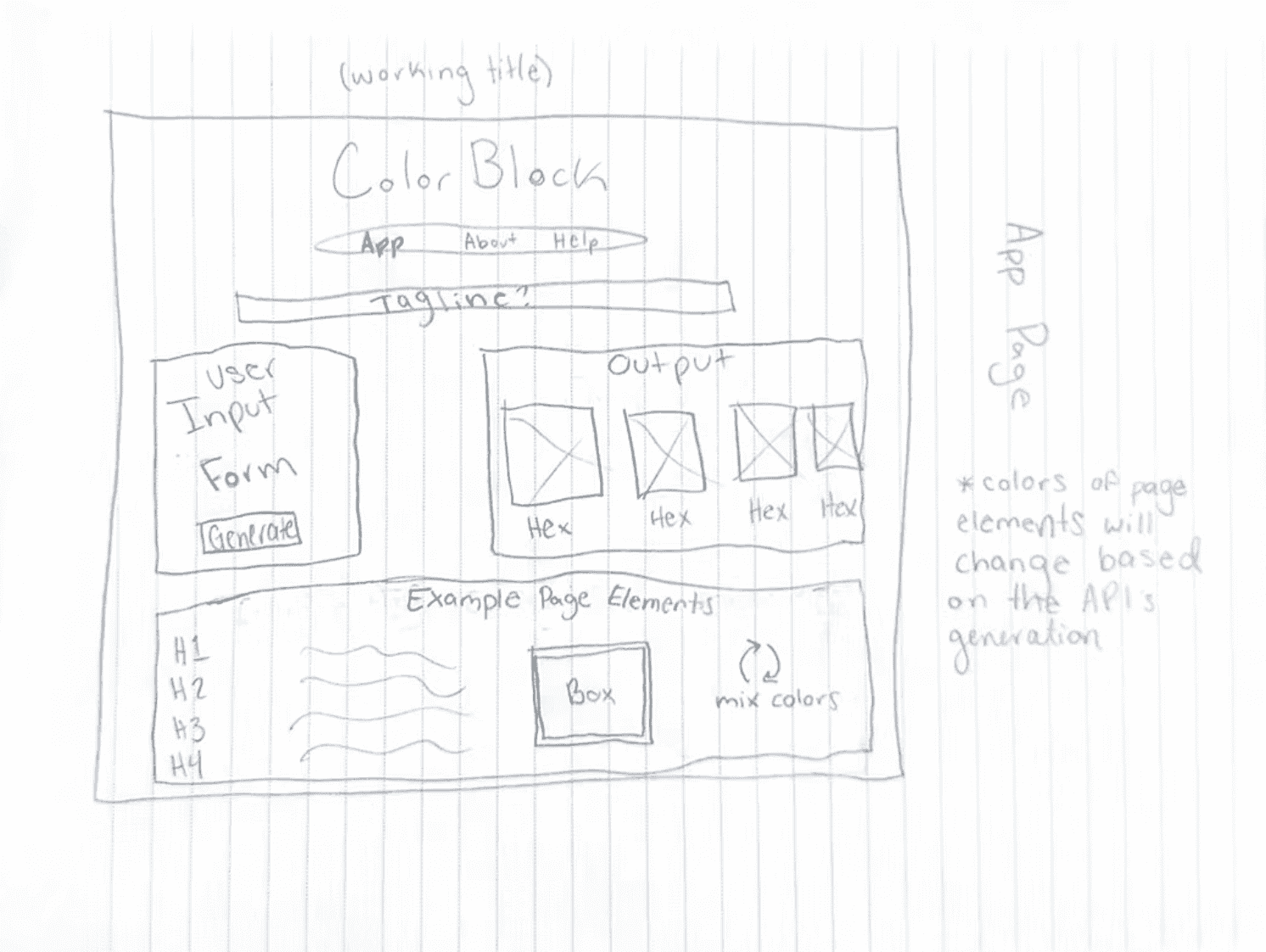
Initial Home/Landing Page
Users inputs 1 or more desired colors into a form -> submits -> page changes its CSS elements to match the inputted color(s) + additional colors.
User can randomize the colors and see what different ones would look like together on a webpage.
About Page
Describes the information problem, how the app would help solve it, and potential stakeholders.


Help Page
Intended to aid the user in understanding how to interact with the app.
DEVELOPMENT
Coding & Roadblocks
I started in Adobe Dreamweaver, building out layout and front-end design first since it was the tool I was most familiar in.
From there, I moved into VS Code to integrate an API, Express, and Supabase — building a fully dynamic web application and documenting it in a GitHub repo with a developer and user manual.
One roadblock I encountered was with my original API. It would not return usable data, and I had to pivot mid project to a different API — Colr.org — that forced me to alter part of my original idea.

KUDOS
I couldn't have done it (as fast) without you,
ChatGPT.
A second pair of helping hands
I used ChatGPT throughout the build process in a few concrete ways:
Writing code — generating starting boilerplate for parts of the app (like initial Express routes and Supabase queries), which I then adapted to fit the project's actual structure and needs.
Catching bugs — when something broke (particularly during the API pivot), I used ChatGPT to help diagnose error messages and narrow down what was going wrong faster than trial-and-error alone.
Explaining unfamiliar concepts — this was my first real introduction to back-end development, so I used it to help explain how APIs, Express, and Supabase actually worked together, rather than just copying solutions I didn't understand.
The core logic, structure, and decisions were still mine — AI sped up the parts of the process (debugging, writing, comprehension) that would've otherwise taken longer to work through solo, especially without a project partner to troubleshoot with.

Representative example
DEMO
See it in
action!
WHAT I BUILT

Starting the App in VS Code
Load Page on Local Host Server
Generate & Visualize Random Color Palettes
Saved Color Palettes & About Page
Due to the API change mid-project, I implemented only randomized color palette generation through clicking, and added a 'Save' option so users can access palettes they liked at a later time.
TAKEAWAYS
This project was my first real introduction to back-end development,
and a strong reintroduction to HTML/CSS.
What I'd do differently:
With more time, I'd build out the paper-prototyping phase further before jumping into code, and add the palette-mixing and user-input features I originally scoped but cut for time.
If I did this again today:
I'd use AI even more deliberately for structuring the Express/Supabase integration up front, rather than mostly leaning on it reactively once I hit roadblocks.

